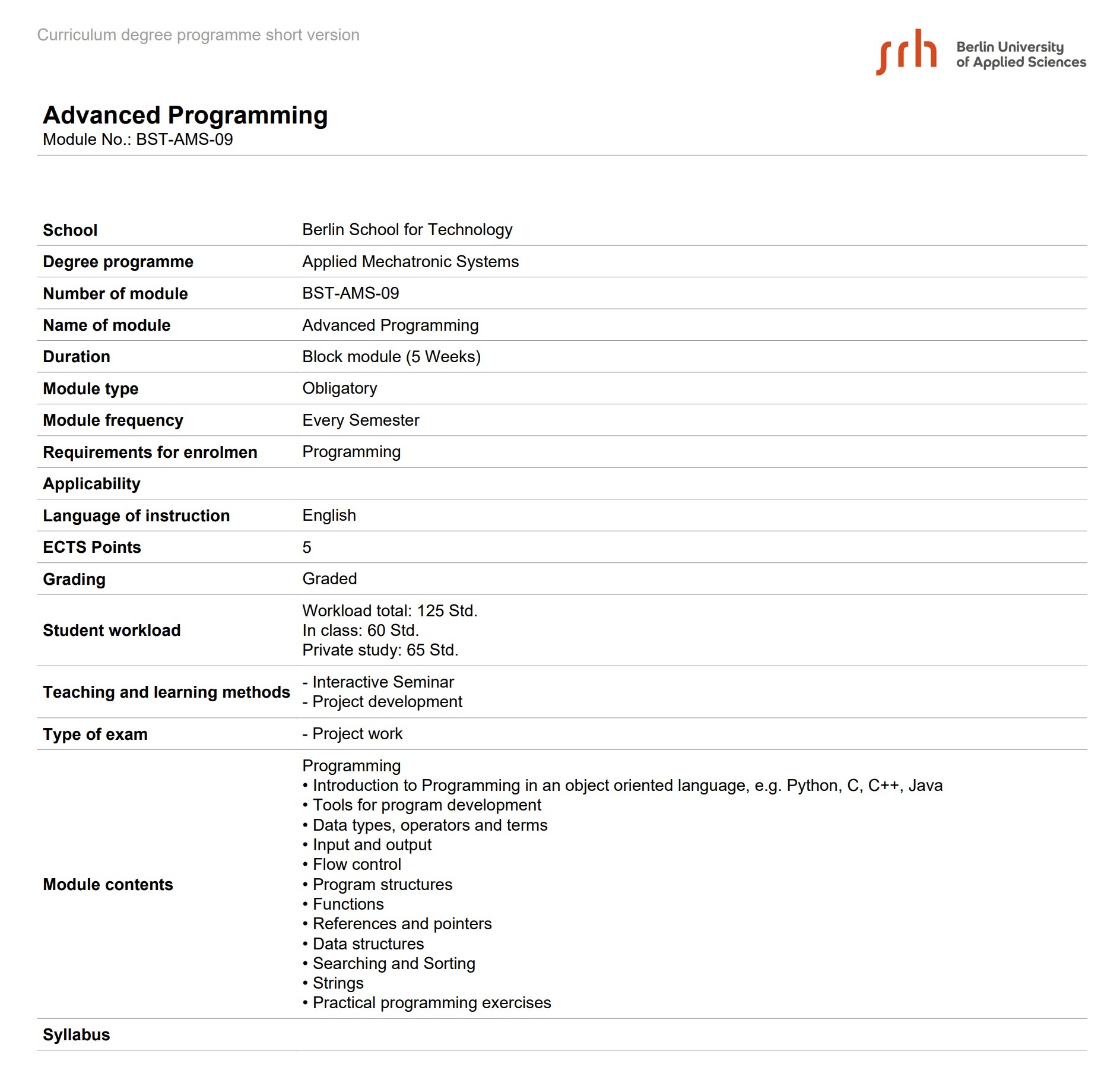
Module Contents
Module Contents
This section lists the topics to be reviewed such as Introduction to Programming in an object oriented language, Tools for program development, etc
Module
Information from Curriculum
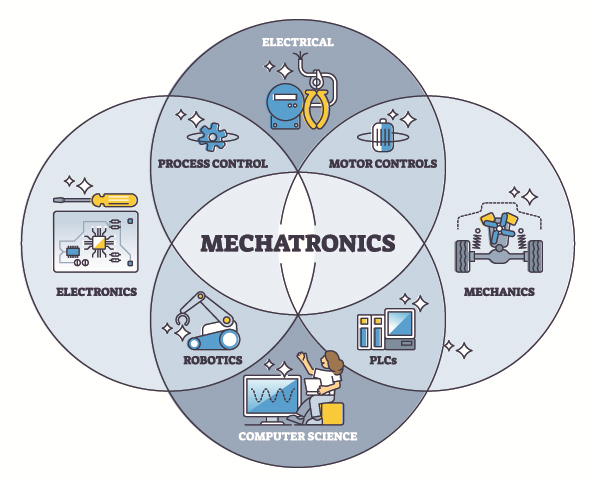
Advantages of Studying Mechatronics
Mechatronics represents the convergence of mechanical engineering, electrical engineering, and software development, creating a unique field with diverse career opportunities and practical applications.
Mechanical Components
- Design and development of physical systems and mechanisms
- Understanding of dynamics, kinematics, and material properties
- Hands-on experience with mechanical design tools and CAD software
- Problem-solving through mechanical innovation and optimization
Electrical Components
- Knowledge of power systems, motors, and actuators
- Circuit design and electrical control systems
- Understanding of sensors and signal processing
- Expertise in power electronics and energy management
Software Components
- Real-time programming and embedded systems development
- Machine learning and AI integration in automation
- Control algorithms and systems optimization
- Industry-standard development environments and tools
Key Benefits: Mechatronics graduates are highly sought after across industries including robotics, automotive, manufacturing, healthcare technology, and renewable energy. The interdisciplinary nature of the field provides flexibility to specialize in any of the three core domains or remain a versatile engineer.
Studying and Living in Berlin
Germany's Capital and Hub for Innovation
Berlin, the capital of Germany, is one of Europe's most vibrant and innovative cities. With a population of over 3.6 million people, Berlin serves as the political, cultural, and economic center of Germany. The city is renowned for its dynamic atmosphere, rich history, and forward-thinking approach to technology and entrepreneurship.
Global AI and Technology Hub
Berlin has emerged as a leading European center for artificial intelligence and technology innovation. The city hosts numerous AI research institutions, startups, and innovation labs working on cutting-edge projects in machine learning, computer vision, and autonomous systems. Major tech companies and research organizations have established operations in Berlin to tap into its talented workforce and innovative ecosystem.
Sources: Berlin Official Portal | TechCrunch | European Commission - Digital Single Market
World-Class Startup Ecosystem
- Startup Capital: Berlin is home to over 10,000 startups, making it one of Europe's largest startup hubs
- Investment Flow: The city attracts billions in venture capital funding annually, supporting entrepreneurs from idea stage to unicorn status
- Success Stories: Notable companies like N26, SoundCloud, and others have grown from Berlin's startup scene
- Support Infrastructure: Numerous accelerators, incubators, and co-working spaces foster entrepreneurial spirit
- Diversity: Berlin's international community brings diverse perspectives and global networks to the tech ecosystem
Sources: StartupDetector Germany | Crunchbase | Berlin Partner für Wirtschaft und Technologie | Forbes
Education and Career Opportunities
Berlin hosts several prestigious universities and technical institutions offering world-class education. Students benefit from proximity to leading research centers, industry partners, and networking opportunities with entrepreneurs and innovators. The city's dynamic job market offers abundant internship and career opportunities across technology, finance, media, and other sectors.

Exam and Final Project
Course Evaluation
Your final grade is composed of two parts:
- 30% — Theoretical Exam: 5 questions selected randomly from the question bank below.
- 70% — Final Project: Implementation of the production line simulation.
Course Calendar
| Week | Date | Activity |
|---|---|---|
| 1 | 18.04 | Class |
| 2 | 25.04 | Class |
| 3 | 02.05 | Class |
| 4 | 09.05 | Class |
| 5 | 16.05 | Class |
| 6 | 23.05 | Focus time: develop your final project |
| 7 | 30.05 | Focus time: develop your final project |
| 8 | 06.06 | Summary Class and Q&A for your project implementation — Theoretical Exam date #1 (if you cannot attend on 13.06) |
| 9 | 13.06 | Theoretical Exam date #2 GR1 at 10am, GR2 at 2h15pm. |
| 10 | 20.06 | Deadline to submit your final project by email. Grades will be uploaded within 7 days. |
Final Project Submission
To submit the final project, send an email containing:
- A PDF document explaining how your project was implemented.
- A link to your website where the project is hosted and described. Documents: FinalProject Repository
Theoretical Exam — Question Bank
Version Control (Git)
Q1. In the kitchen analogy, what does the “staging area” represent and which Git command moves a file into it?
The staging area is the cutting board — ingredients prepped and ready to be plated. The command git add <file> moves a file from the working directory (counter) onto the staging area.
Q2. What does git init do, and what artifact does it create in your project folder?
git init turns an ordinary directory into a Git repository. It creates a hidden .git folder where every future change is recorded — analogous to a head chef setting up a private notebook in an empty kitchen.
Q3. Explain the three-zone mental model of Git: working directory, staging area, and commit history.
The working directory (counter) is where you actively edit files. git add moves chosen changes to the staging area (cutting board). git commit permanently snapshots the staged content into the commit history (cookbook), recording who, when, and what.
Q4. What is the difference between git diff and git status?
git status lists which files have changed or are untracked. git diff shows the actual line-by-line differences between the working directory and the last commit.
Q5. What does git restore <file> do and when would you use it?
It discards all uncommitted changes to a file and resets it to the last committed state. Use it when your edits were a mistake and you want to return to the last known good version.
Q6. What is a Git branch and why are branches described as “cheap and isolated”?
A branch is a pointer to a parallel line of commits — an experimental kitchen where you can work freely without touching the main menu. Branches are cheap because Git stores only deltas between commits, and isolated because changes on one branch never affect another.
Q7. What does git clone <url> do and how is it different from git init?
git clone downloads an existing repository including its full commit history onto your local machine. git init starts a brand-new, empty repository. Use clone when joining an existing project, init when starting from scratch.
Q8. What is a “remote” in Git, and what do git push and git pull do?
A remote is a shared copy of the repository hosted on a server (e.g., GitHub). git push sends local commits up to the remote. git pull fetches and integrates new commits from the remote into your local branch.
Production Line & Software Architecture
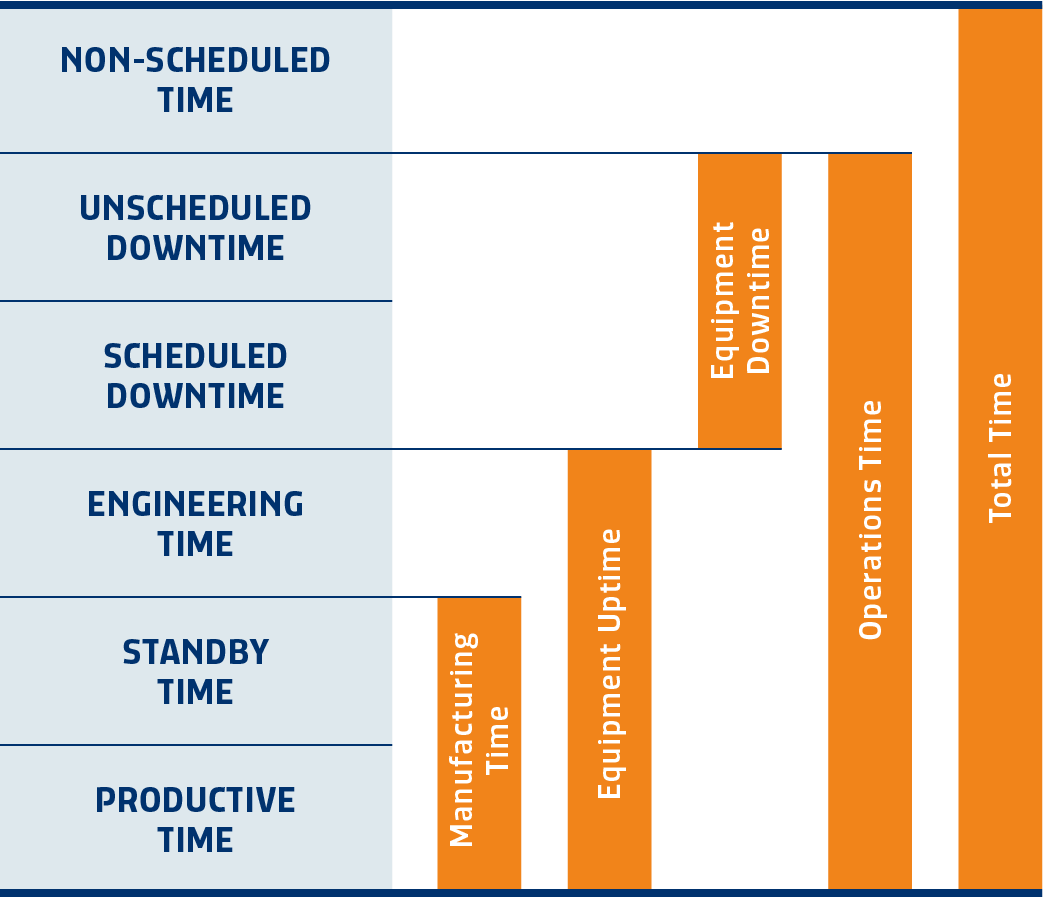
Q9. Which are the SEMI E10 Equipment States? Describe them.
- STANDBY (or IDLE) – The equipment is available for processing material but is not processing any material at this time.
- PRODUCTIVE – The equipment is processing material.
- ENGINEERING – The equipment is under engineering control for tests, experiments, or any activity that produces non-productive or non-sellable results.
- SCHEDULED DOWNTIME – The equipment is scheduled for a recurring preventive maintenance (PM) procedure and, as a result of the procedure, cannot (or may not be permitted to) process material.
- UNSCHEDULED DOWNTIME – The equipment is not able to process material due to some type of unscheduled and/or unanticipated event.
- NONSCHEDULED DOWNTIME – The equipment is unable to process material because of the effects of an external event, such as a facility shutdown or site-wide power failure.
Q10. How are the SEMI E10 defined “buckets” of time represented?
Q11. What is an HMI (Human-Machine Interface) and what are the three rules of good HMI design?
An HMI is the operator’s window into the machine’s back-end state. The three rules are: (1) show only what the operator needs right now, (2) make abnormal states visually unmistakable, and (3) never let the screen lie about the machine’s state.
Q12. What is the difference between Back End and Front End, and how do they map to the ball pen simulation files?
The Back End holds data, runs rules, and makes decisions (invisible to the user). The Front End presents state and forwards user intent. ballpen_production_line.py is the Back End; ballpen_animation.py is the Front End / HMI.
Q13. What is the role of the Abstract Base Class Station in the ball pen back end?
Station defines the contract every workstation must honor: given an input, return an output or None. Concrete subclasses implement process their own way, letting the orchestrator treat every station identically and enforcing the Single Responsibility Principle.
Q14. What is the SEMI E10 standard and what are the three machine states used in the production-line demo?
SEMI E10 classifies every second of a machine’s time into mutually exclusive states. The three in the demo are: Productive (processing parts), Standby (ready but waiting), and Unscheduled Downtime (unexpected failure).
Q15. What does OEE stand for, how is it calculated, and what is the world-class target?
OEE = Availability × Performance × Quality. A world-class line targets OEE ≥ 85%. Unscheduled Downtime collapses Availability and therefore OEE regardless of how well other stations perform.
Q16. What is a Manufacturing Execution System (MES) and at which ISA-95 level does it operate?
A MES tracks, coordinates, and optimizes everything on the factory floor in real time. It operates at Level 3 of ISA-95, sitting between Level 1–2 (PLCs/SCADA) and Level 4 (ERP/business planning).
Q17. What is a Finite State Machine (FSM) and where is one applied in ballpen_animation.py?
An FSM is a model where an entity occupies exactly one of a finite set of states at a time. In ballpen_animation.py, each in-flight item has a stage field ("to_qc", "to_bin", "falling", "to_assembly") that the renderer reads to decide where to draw it.
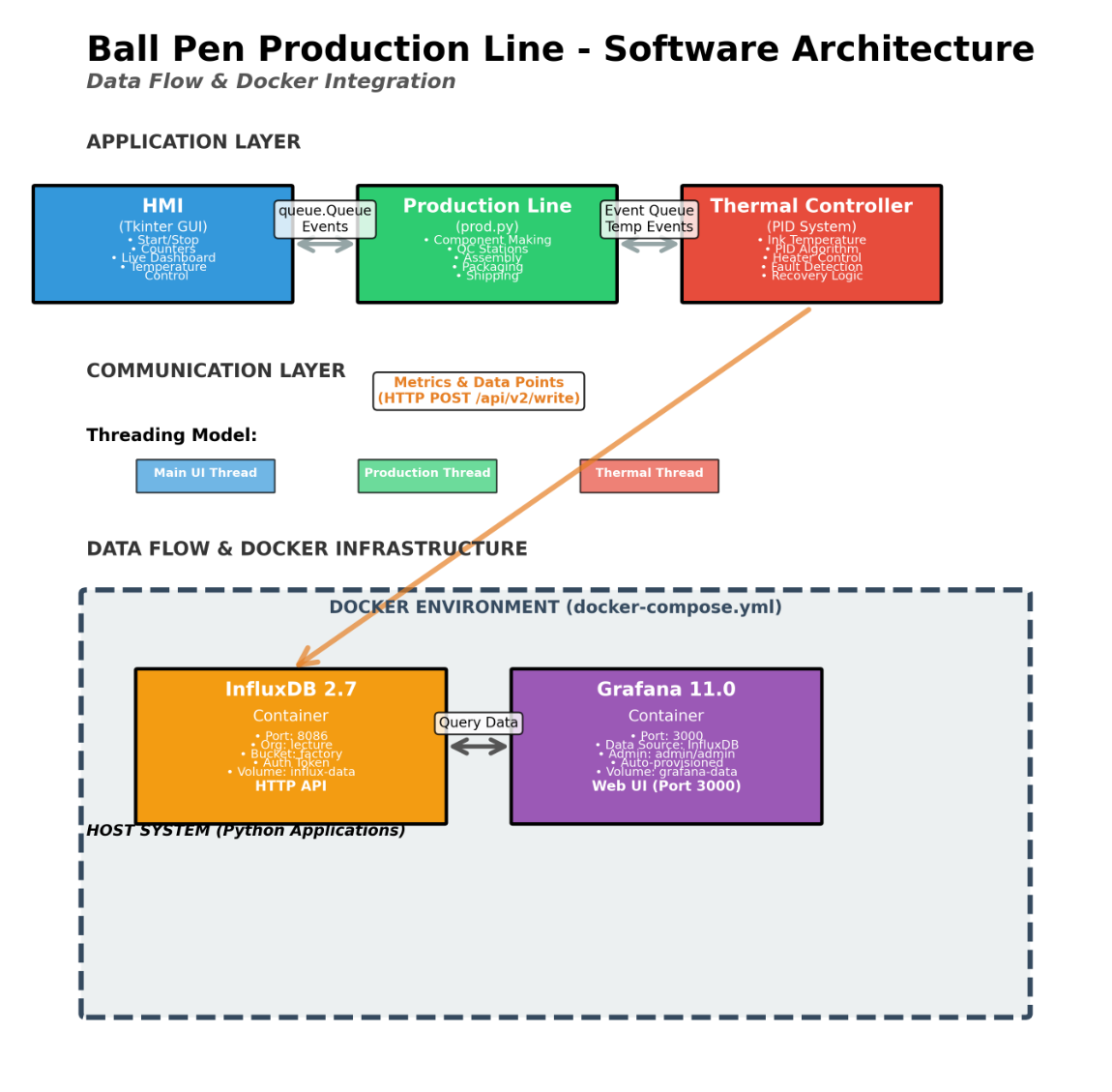
Q18. In the InfluxDB/Grafana stack, which component writes data, which stores it, and which visualizes it?
producer.py writes data via HTTP to InfluxDB (storage). Grafana queries InfluxDB and renders dashboards. The producer never talks to Grafana directly — mirroring real factory architectures where data source and visualization are independently replaceable.
Q19. What is Docker and what are its main applications?
Docker is a containerization platform that packages applications and their dependencies into lightweight, portable containers. Docker ensures consistency across development, testing, and production environments. Main applications: microservices architecture, CI/CD pipelines, application deployment and scaling, isolated development environments, and facilitating multi-container applications through orchestration platforms like Kubernetes.
Q20. Describe how the architecture of your projet looks like. This is an example of the production line studied in class